Pipelines
Every step, and where the model gets a say
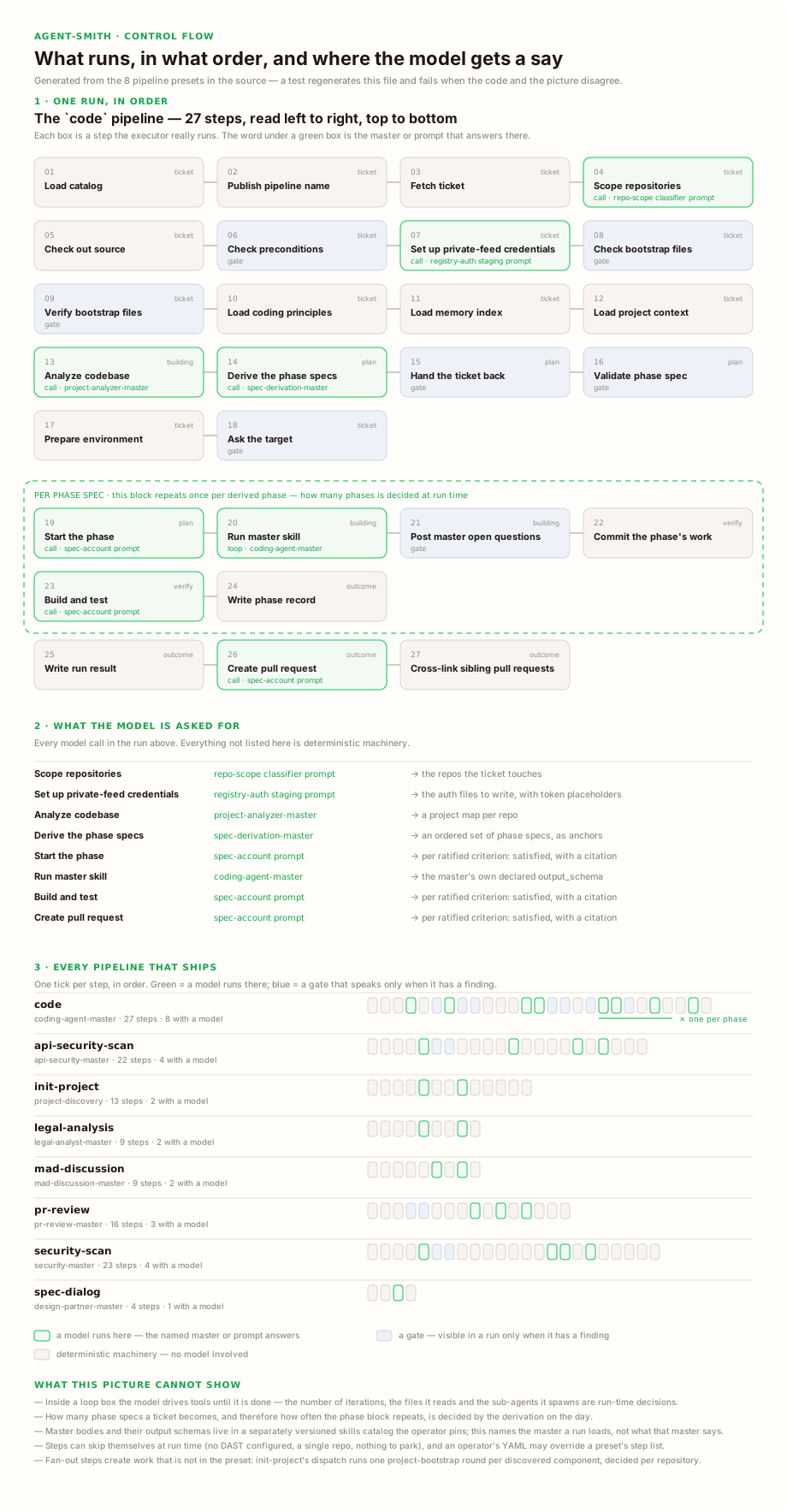
This one is generated from the pipeline definitions in the source, by a test that fails when the code and the picture disagree. So it is what the orchestrator really executes, in that order.
Each box is one step. Green means a model runs there, and it names which one and what it is asked for. Grey is plain machinery with no model involved. Blue is a gate that speaks up only when it has something to report. The dashed frame is the part that repeats once per derived spec, and how many specs a ticket becomes is decided during the run.
Which surface reads this
The YAML on this page is the file format. On a server the same values live in the database and are edited in the Config studio; the CLI reads them from agentsmith.yml. agent-smith config import moves one into the other. See Where configuration lives.
Agent Smith ships eight pipeline presets. Each one is a fixed list of steps defined in code, and each one that needs judgement hands it to a single master skill at its AgenticMaster step.
Pipeline overview
| Pipeline | Started by | What it does | Master |
|---|---|---|---|
| code | agent-smith code --ticket N --project P, a ticket label, a PR comment |
Ticket → specs → code → verified green → PR | coding-agent-master |
| pr-review | a PR comment | Reviews the PR diff and posts line-anchored comments | pr-review-master |
| security-scan | agent-smith security-scan --agent A, a ticket label, the review label on a PR, a PR comment |
Code security review with SARIF output | security-master |
| api-security-scan | agent-smith api-scan --swagger … --target …, a ticket label |
Nuclei, Spectral and ZAP against a running API, triaged by a master | api-security-master |
| legal-analysis | agent-smith legal --source F |
Reads a contract and writes a clause-level analysis | legal-analyst-master |
| mad-discussion | agent-smith mad --ticket N --project P, a ticket label |
Five-perspective design discussion, committed as a PR | mad-discussion-master |
| init-project | agent-smith init --project P, a ticket label |
Bootstraps .agentsmith/ in every repo of a project |
— |
| spec-dialog | a design conversation in the dashboard or a chat thread | The conversational design partner, see Spec dialogue | design-partner-master |
A PR comment can start code, security-scan and pr-review, and nothing else.
These eight names are the whole vocabulary. The retired names fix-bug, fix-no-test, add-feature and phase-execution no longer resolve anywhere: write code instead. skill-manager and autonomous were removed without a replacement. Every refusal of a retired name says which of the two it is: a configuration that still routes to one gets a startup finding, and a run started with one is refused, and both name the replacement or the reason the name went.
All pipeline commands support --dry-run to preview the execution plan without running it. Utility commands (compile-wiki, security-trend) also support --dry-run.
Two init-project behaviors worth knowing: re-running init preserves your manual context.yaml edits and only backfills missing auto-detectable fields, and an init run that produces no changes closes its ticket cleanly ("already bootstrapped") instead of leaving the poller looping on it. Re-init by moving the ticket back into a trigger status.
How pipelines work
Every pipeline is an ordered list of commands. Each command has a matching handler that does the actual work. Commands share a PipelineContext, a key-value store that carries data between steps.
Pipeline: code
├── LoadCatalog            → loads the skills catalog (embedded by default)
├── PipelineNameInitializer→ stamps the pipeline name for master routing
├── FetchTicket            → reads ticket + comments + attachments from the tracker
├── ScopeRepos             → narrows the run to the repos the ticket touches
├── CheckoutSource         → clones repos, creates branches
├── RunPreflight           → checks the sandbox and branch preconditions
├── SetupRegistryAuth      → pre-stages private-feed credentials
├── BootstrapCheck/Gate    → aborts early if the repo was never initialized
├── LoadCodingPrinciples   → loads the coding principles from the repo
├── LoadMemoryIndex        → loads the project's recorded memory index
├── LoadContext            → loads .agentsmith/ context files
├── AnalyzeCode            → scout agent maps relevant files
├── DeriveSpec             → derives the specs from the ticket
├── SpecHandback           → hands the ticket back when it cannot be implemented as written
├── SpecGate               → validates the specs before the master starts
├── EnsurePrerequisites    → installs dependencies
├── ProbeTarget            → asks the target the questions its context declares
├── MaterializeReferenceSets → writes the websites the approval cites, outside the commit
├── SpecSequence           → splices one master → verify → record block per spec
├── WriteRunResult         → writes result.md with cost/token data
├── CommitAndPR            → commits, pushes, opens PR (secret-scanned)
└── PrCrossLink            → cross-links sibling PRs (multi-repo)
The per-pipeline pages list the steps of the other presets.
Steps added while the run is going
Two steps grow the pipeline at runtime. In code, SpecSequence inserts one master, verify and record block for each derived spec, in order; a spec whose verification fails stops the pipeline there, and the finalizing steps still run. In init-project, BootstrapDispatch fans out one bootstrap round per repository component that BootstrapDiscover found.
The scan, review and discussion pipelines do not grow. Their master decides its own fan-out inside the AgenticMaster step, by delegating to sub-agents.
Per-project pipeline settings
A project lists the pipelines it hosts. An entry is either a name or an object that overrides a few settings for that one pipeline:
projects:
  todolist:
    pipelines:
      - code
      - name: pr-review
        agent: claude-review          # a different agent from the agents: catalog
      - name: security-scan
        skills_path: skills           # a different skills root
        coding_principles_path: .agentsmith/security-principles.md
The step lists themselves are not configurable. There is no way to define a custom pipeline in agentsmith.yml; the presets are defined in code.
Pipeline types
Every preset carries an interaction type, used to classify the run:
| Type | Pipelines |
|---|---|
| hierarchical | code |
| structured | security-scan, api-security-scan, pr-review |
| discussion | legal-analysis, mad-discussion, init-project, spec-dialog |
Structured pipelines emit findings rather than code changes. The type does not choose skills or rounds: every preset runs its fixed step list, and the judgement happens inside its master.
Next steps
- Fix Bug / Add Feature — the code pipeline
- PR review — review a pull request
- Security Scan — code security review
- API Scan — live API scanning
- Legal Analysis — contract review
- MAD Discussion — multi-agent design debate