The Config studio
The dashboard has two halves. The Runs side is where you watch work happen. The Configuration side is where you decide what work is possible. Toggle between them at the top of the left rail, or go straight to /config.
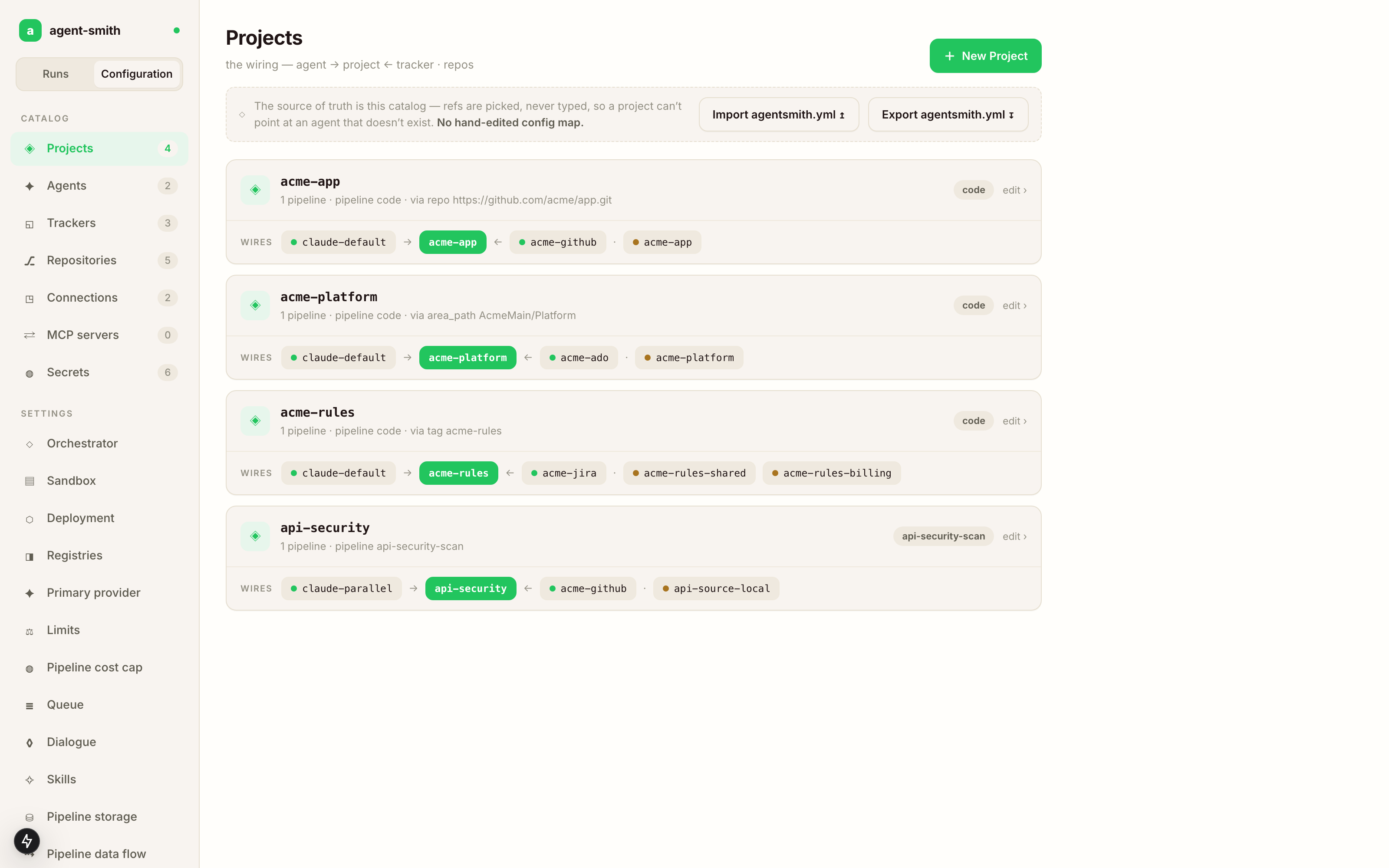
The rail is split the same way the configuration is: a catalog of things that exist, then the global settings that apply to all of them, then the change history. Counts next to each catalog tell you how many entries you have, which is a surprisingly good smoke test after an import. Every list and every picker is sorted alphabetically, ignoring case, so the entry you're looking for is where you expect it and not wherever the database happened to return it.
The seven catalogs
| Catalog | What lives in it |
|---|---|
| Projects | the wiring: one agent, one tracker, a set of repos, templates, and how tickets route here |
| Agents | LLM providers and the model they use per role |
| Trackers | ticket sources, their workflow states, and their trigger behavior |
| Repositories | individual repos the pipelines clone and push to |
| Connections | repo discovery scopes, an org or project plus its auth, so you don't list 40 repos by hand |
| MCP servers | external MCP tool servers |
| Secrets | the env var names your config refers to, with values staying in the runtime environment |
Secrets deserve the emphasis. The studio stores the name github_token and the fact that something references it. The actual token lives in your environment or your k8s Secret, and it never enters the database or an export.
Adding something
Every catalog has a New button in the top right, and every entry has an edit on its card. Both open the same drawer.
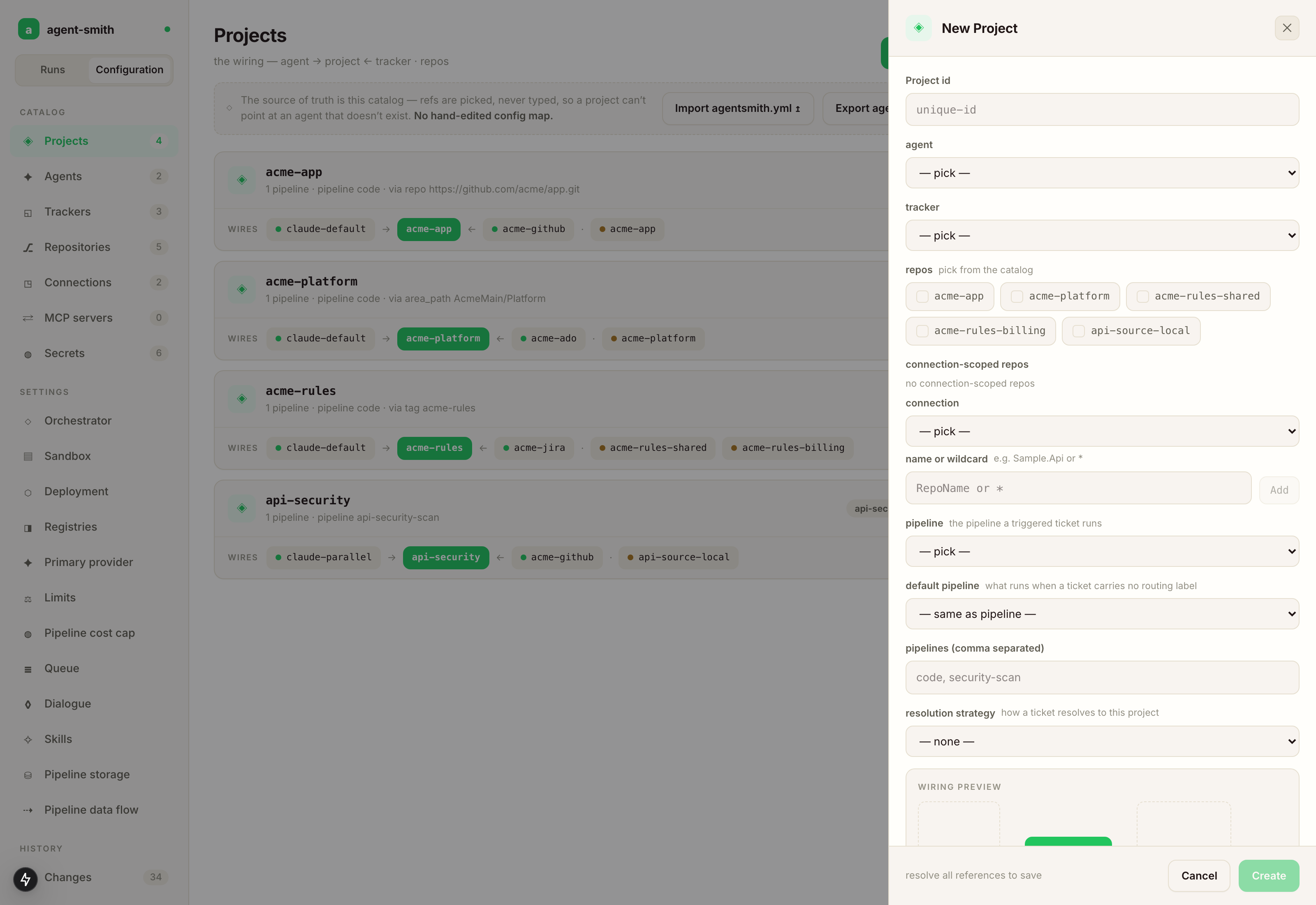
Look at what the drawer does with references. agent, tracker and connection are dropdowns that list what you actually have. Repos are picked from the repo catalog or from a connection's discovered repos. Every reference is picked from the catalog. A hand edited config file lets you point a project at an agent you renamed last week, and you find out at 2am; picking from a list is how that stops being possible. For a project, the line at the bottom of the drawer names what is still unresolved, and Create stays disabled until every reference resolves.
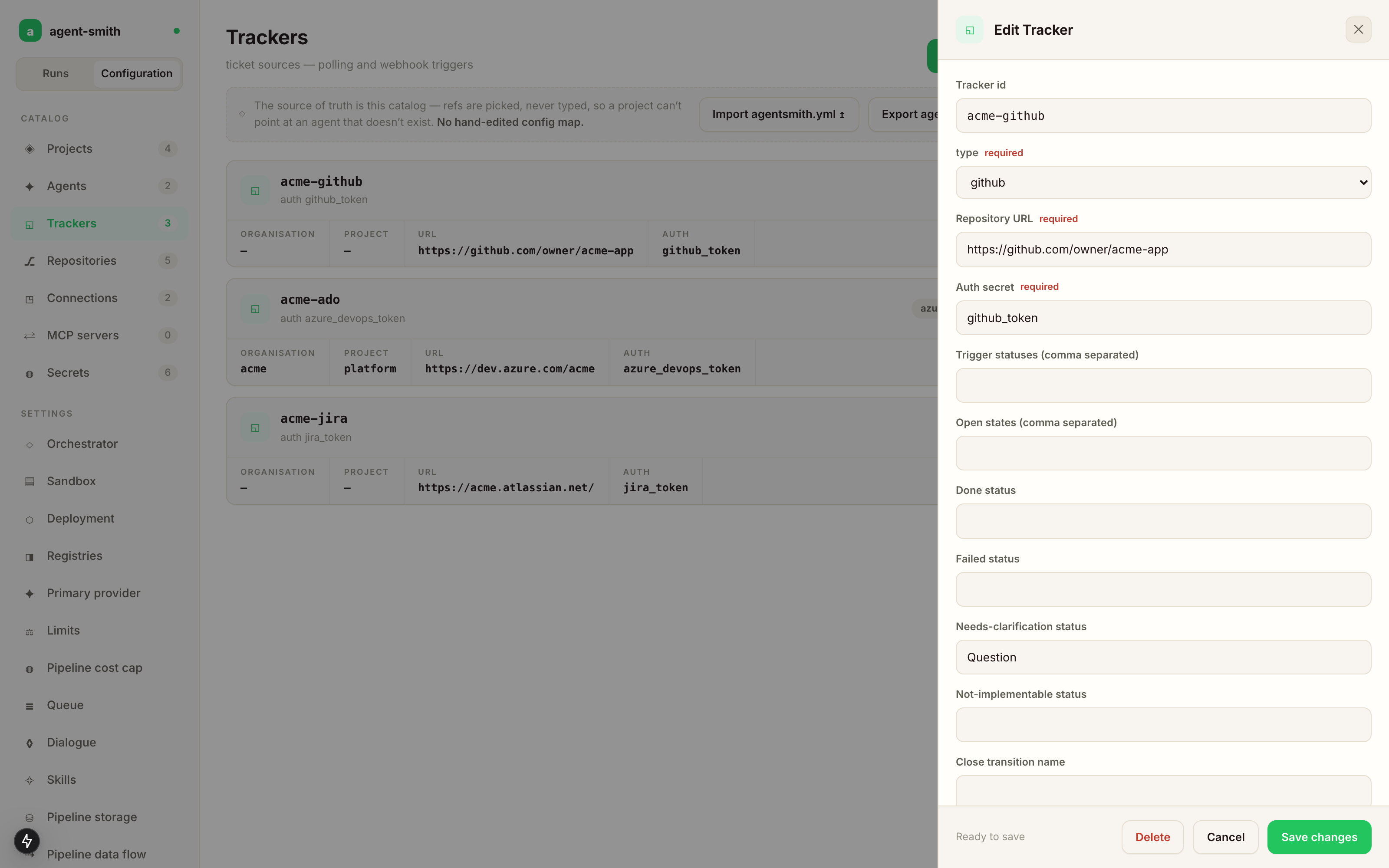
The fields themselves come from the backend. Pick type: github on a tracker and you get Repository URL. Pick azure_devops and you get organization and project instead. That list of types is served from the same registry the runtime resolves against, so everything you can pick is something the server can actually construct.
Before you save, the drawer shows what the server would report about the draft, under "what the server would report — before you save". A required field that is still empty blocks the save, and the footer says which one: "<field> is required here — see the field below".
Names are case-insensitive
TodoList, todolist and TODOLIST are one name everywhere a configured name is looked up: a project's agent:, a repo ref, a template target, a CLI --project. That's convenient until two entries of one catalog differ only in case, because then both spell the same entity. So the studio refuses to store a name whose differently cased twin is already there, and the refusal names both spellings. An import carrying such a pair is refused whole, and a configuration that already holds one reports it as a startup finding. The way out of an existing pair is export, keep one spelling, import with --force.
Projects
A project card shows its facts as separate marks: the default pipeline (default · code, or no default pipeline), the resolution rule if there is one, the repository count, built after <project> when it has templates, and, only when something is wrong, a count of unfinished templates or of unresolved references. Those last two are different problems with different fixes, so the card keeps them apart: an unresolved reference names a catalog entry that doesn't exist, an unfinished template is one nobody finished filling in.
Click the card's row and it expands into the wiring graph, five columns from left to right: agent and tracker, the project, its repositories, the contexts those repositories hold, and what each context is built after. A context belongs to a repository and a template belongs to a context, which is why they get their own columns. Long names are shortened, and hovering one shows it in full. Colour is kept for what is wrong. It catches the class of mistake the drawer can't: the wiring that resolves fine and is still wrong, like the staging tracker pointed at the production repo, every reference valid, the shape visibly not what you meant.
Edit opens the drawer. Next to it sits Initialize, which runs init-project for the project with no ticket, an Auto-accept PRs toggle (on by default) that merges the pull requests the initialization opens where the branch policy allows it, and a Refresh principles toggle (off by default) that recomposes an existing principles.md from the catalog (core, language delta and framework overlays) and keeps its Project Specifics section. Both apply to the run they start and to nothing else, and neither affects the other. While the run is going the button turns into "Initializing — view run", and clicking again opens that run rather than starting a second one.
The project drawer
The project drawer has six tabs. A tab that needs attention carries a mark.
identity. The project's name, and its agent and tracker, both picked from the catalogs.
repos. Repos from the repository catalog, and repos from a connection. Pick a connection and the picker lists what discovery found there, with each repo's default branch. A connection with three hundred repos doesn't mean three hundred chips: there's a filter box, a count of how many matched out of how many were discovered, and a capped list with "show more". The filter box doubles as the wildcard box. Type TodoList.* and it offers to add the rule acme/TodoList.* with the number of repos it matches right now; every discovered repo a rule already covers shows as covered instead of offering a second, redundant pick. With a wildcard in the filter, "select all" proposes that one rule rather than ticking every match individually. The wildcard is *; see Repos: multi-repo for how rules and exclusions resolve.
pipeline. One control, the project's default pipeline, picked from the pipelines the product offers. Next to it, read only, the tracker's label map, because that's what actually decides what an incoming ticket runs. The panel says which of three cases you're in: the tracker maps labels, and a ticket matching none of them isn't routed to this project at all; or the tracker maps no label and declares a default pipeline, and every ticket runs that; or it declares neither, and every ticket runs code while the panel tells you to set a default pipeline on the tracker. A stored configuration may still carry a retired pipeline name; it loads, labelled as retired ("it no longer runs; pick a current one to replace it"), and it isn't offered again.
templates. What each context of this project is built after. See Project templates.
routing. The resolution strategy (tag, area_path, repo, to_address) and its value, which is how a ticket finds this project. Project resolution has what each strategy compares.
sandbox. Per-project overrides for the sandbox. Every field is an override: leave it empty and the project inherits the value the placeholder names, and the help text says where that value comes from (a Settings value, the SANDBOX_HOLD_SECONDS environment variable, a built-in default, or "detected per run from the repository"). The fields are toolchain image, step timeout (seconds), run_command timeout (seconds), agent registry, agent version, sandbox hold (seconds), cpu & memory (all four quantities or none), per-language images, secret environment variables and mounted secret files. The secret fields inherit nothing, because there's no process-wide secrets block to inherit from, and they hold Kubernetes Secret names and keys, never values. An override applies to the next run of the project; the sandbox hold applies to the next turn of a design conversation. What each of these does at runtime is on Sandbox architecture.
Trackers
A tracker owns the workflow for every project routed to it: trigger statuses, open states, done, failed and needs-clarification statuses, the close transition name, the label map ("Pipeline by label") and the "Default pipeline" for a ticket no label matched. Both pipeline fields are pick lists over the pipelines a ticket can actually be routed to, so you can't type a pipeline that doesn't exist.
Three more maps change what Agent Smith writes onto your board:
- Label names renames the labels the framework writes (
agent-smith:doneand friends, plus the approved-set stamp) for boards with their own vocabulary. - Lifecycle status names (Jira) moves issues through native workflow statuses instead of carrying the lifecycle only as labels.
- Work item kind by filing role (Azure DevOps and Jira) sets which work-item or issue type a ticket Agent Smith files is created as.
The tracker pages under Connect your stuff spell out the keys. One refusal worth knowing up front: a label the framework writes may not be the same word as one of your routing words (a key of the label map, or a project's resolution value). The studio refuses that save and names the word, because a ticket would otherwise route itself on the framework's own bookkeeping.
Agents and their roles
An agent is a provider plus a model per role, and the drawer shows all eight roles: coding, scout, primary, planning, reasoning, summarization, contextGeneration, codeMapGeneration. Each takes a model, an optional deployment name for Azure's per deployment routing, and an optional max tokens. Three are optional: leave out reasoning or contextGeneration and it resolves to primary, leave out codeMapGeneration and it resolves to scout. The drawer offers reasoning and contextGeneration as a seed rather than a filled row.
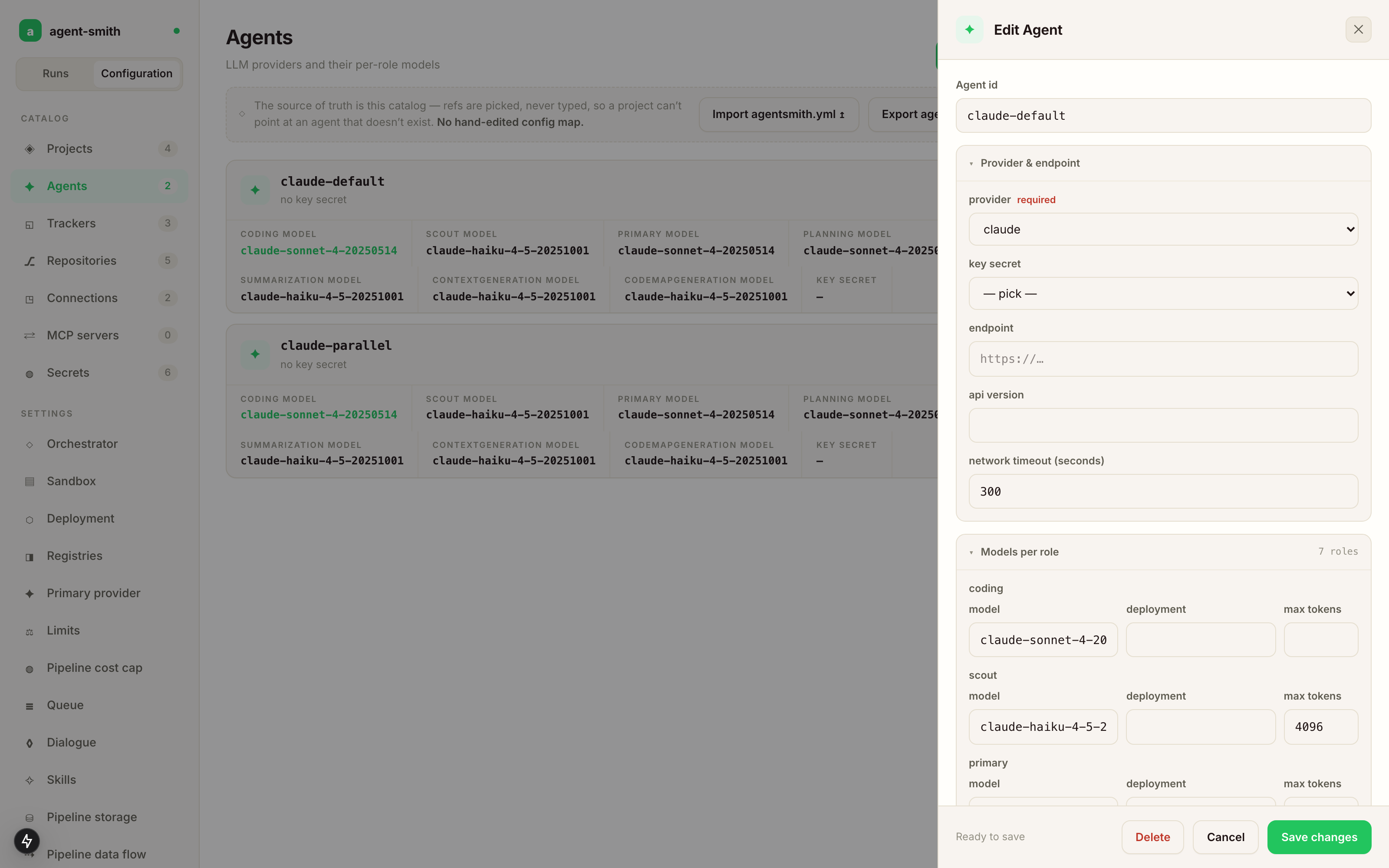
The optional sections (pricing, cache, compaction, retry) stay collapsed and absent until you add them, so an agent you never touched keeps a clean record instead of a wall of persisted defaults. Pricing is the exception in practice: every model a role uses needs a pricing entry, and the studio refuses to save an agent whose role model has none ("has no pricing entry — add it to the agent's pricing table"). That's what keeps the dollar figure on every run honest.
Changes and revert
Every write lands in the change feed with the fields it touched, the old value, the new value, who did it, and when.
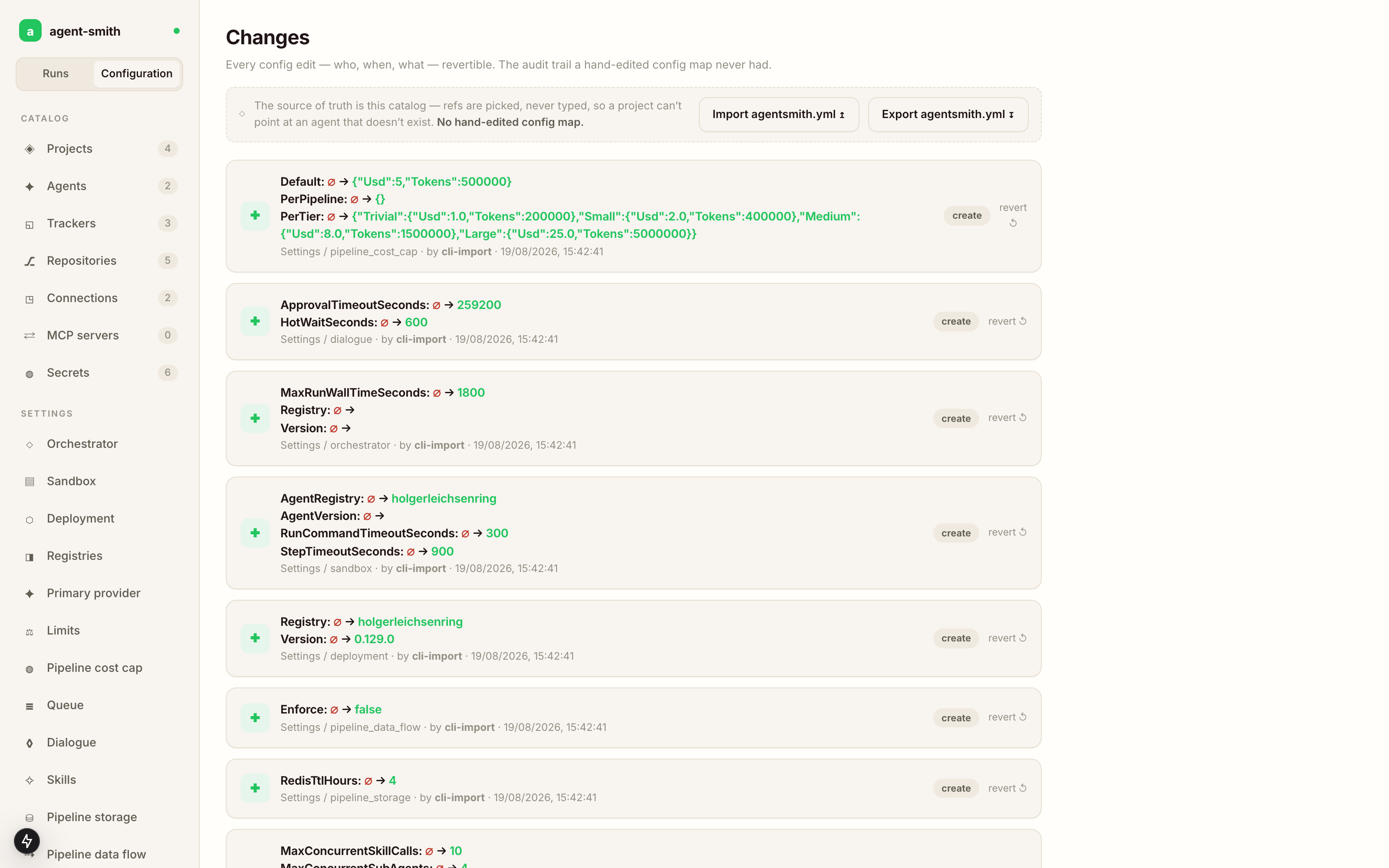
Each row has a revert, which is the part a mounted ConfigMap could never give you. Someone widened a cost cap three weeks ago, the run bills went up, and now you can find that exact edit and undo it, instead of reconstructing what the file used to say from a git history that may never have existed.
What the studio does not carry
pipeline_triggers:, the global label to pipeline map. It's stored in the database and the server serves it, but there's no catalog screen for it. To change it: export, edit the block, import with--force.trace:, whether a run records its full conversation. On a server, set theAGENTSMITH_TRACEenvironment variable instead.dialogue.dashboard_url, the dashboard address a question comment links to. Set it through import.
Everything else you'd want to change day to day is here or under Settings.